Why Enterprise Architecture Demands Event-Driven AI Agents
Modern enterprises are moving rapidly from experimenting with isolated LLM chat widgets to integrating autonomous AI agents directly into their core business workflows. However, deploying AI agents inside an enterprise architecture (EA) introduces unique system integration, reliability, and human-oversight challenges.
A traditional synchronous request-response model (like HTTP REST) is insufficient for production-grade agentic systems. Instead, enterprise AI agents can be built on an event-driven architecture.
In this post, we explore why event-driven AI agents are a necessity in the enterprise, how they integrate with existing system parameters, and how to structure them using the Google Agent Development Kit (ADK).
1. Why Do You Need Event-Driven Agents?
In a typical consumer-facing chat app, a user types a query and waits for a streaming response. If the network drops or the query takes 60 seconds to process, the user might see an error and hit refresh. In an enterprise setting, this failure mode is unacceptable.
AI agents performing complex reasoning, multi-step planning, or external API orchestrations cannot guarantee sub-second responses. They require seconds, or even minutes, to execute.
The Pitfalls of Synchronous Communication
- UI Long-Polling and Timeouts: Expecting a web frontend or middleware to maintain open HTTP connections or long-poll a slow-running agent leads to connection timeouts, resource exhaustion, and brittle UI states.
- Lack of Resilience: If an agent fails midway through a multi-step task, a synchronous system has no native mechanism to resume or retry from the failure point, resulting in lost work and inconsistent system states.
- Tight Coupling: Synchronous designs tightly couple the client and the agent, making it difficult to scale agents independently or change their orchestration logic without modifying client-side code.
The Event-Driven Approach
By shifting to an event-driven design, the system decouples trigger conditions from execution:
- A system or user action publishes a
TaskCreatedevent to a message broker. - The agent listens to the broker, consumes the event, and processes the task asynchronously.
- Once completed, the agent publishes a
TaskCompletedevent. - Existing systems or frontend clients (via WebSockets or SSE) listen for the completion event to update the state.
2. Guaranteed Delivery on Both Sides
In enterprise workflows (e.g., invoice processing, database updates, or order provisioning), dropping a message is not an option. Event-driven architectures introduce message brokers (like Google Cloud Pub/Sub, Apache Kafka, or RabbitMQ) that act as durable buffers.
- At-Least-Once Delivery: If an agent crashes while processing an event, the broker will redeliver the event to another instance or retry it once the agent recovers.
- Dead Letter Queues (DLQs): If an event repeatedly fails (e.g., due to an agent exception or LLM rate limit), it is routed to a DLQ for developer investigation rather than silently disappearing.
- Backpressure Management: During peak traffic, incoming tasks are buffered in a queue. Agents pull messages at a sustainable rate rather than being overwhelmed by concurrent HTTP requests, protecting downstream APIs and LLM rate quotas.
3. Integrating AI Agents with Existing Enterprise Event Listeners
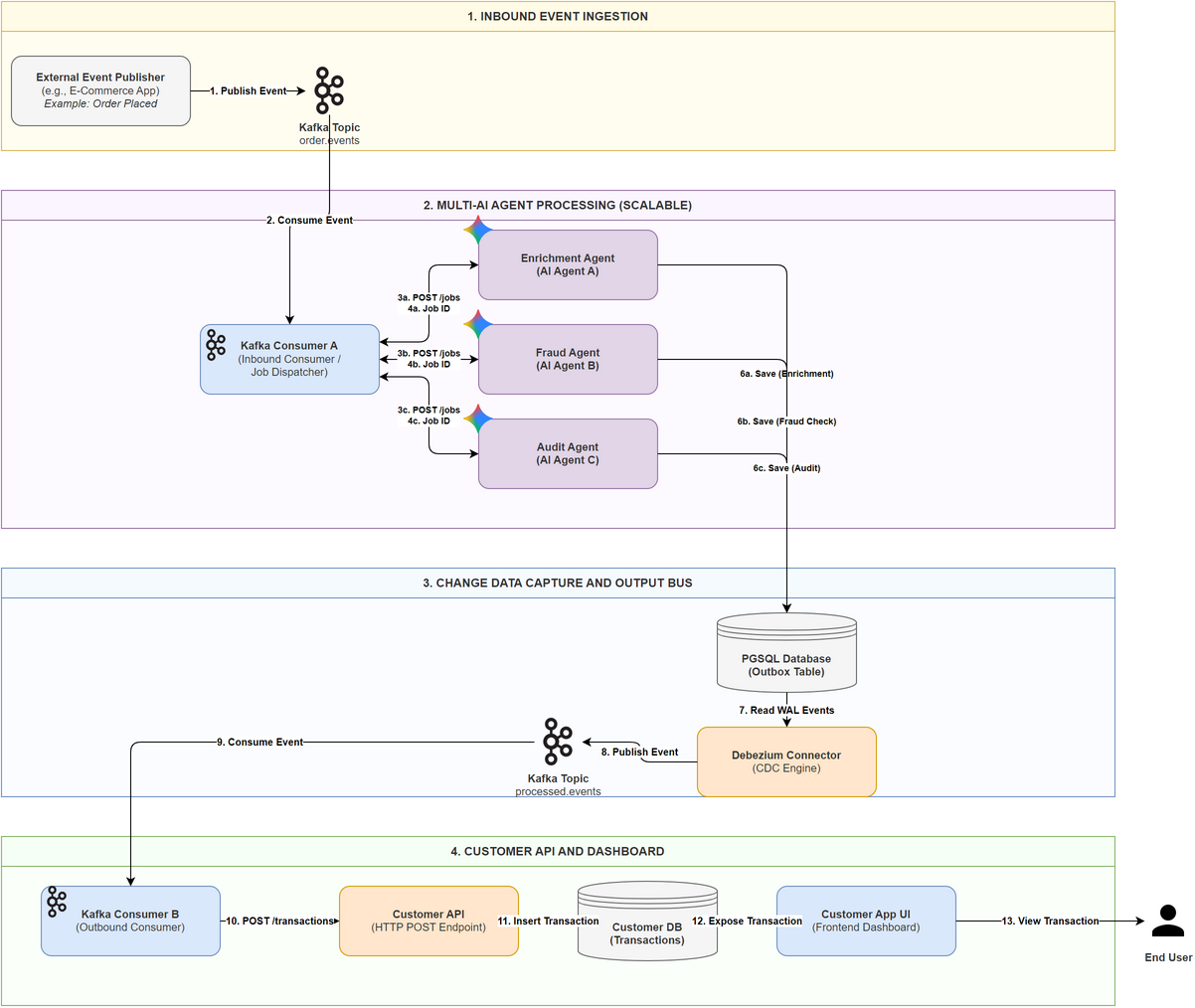
This summary integrates the Transactional Outbox Pattern with a CDC-based Multi-tenant Pipeline to ensure that your ADK Agent Platform is reliable, scalable, and secure.
1. High-Level Architecture Diagram (The "Event Plane")
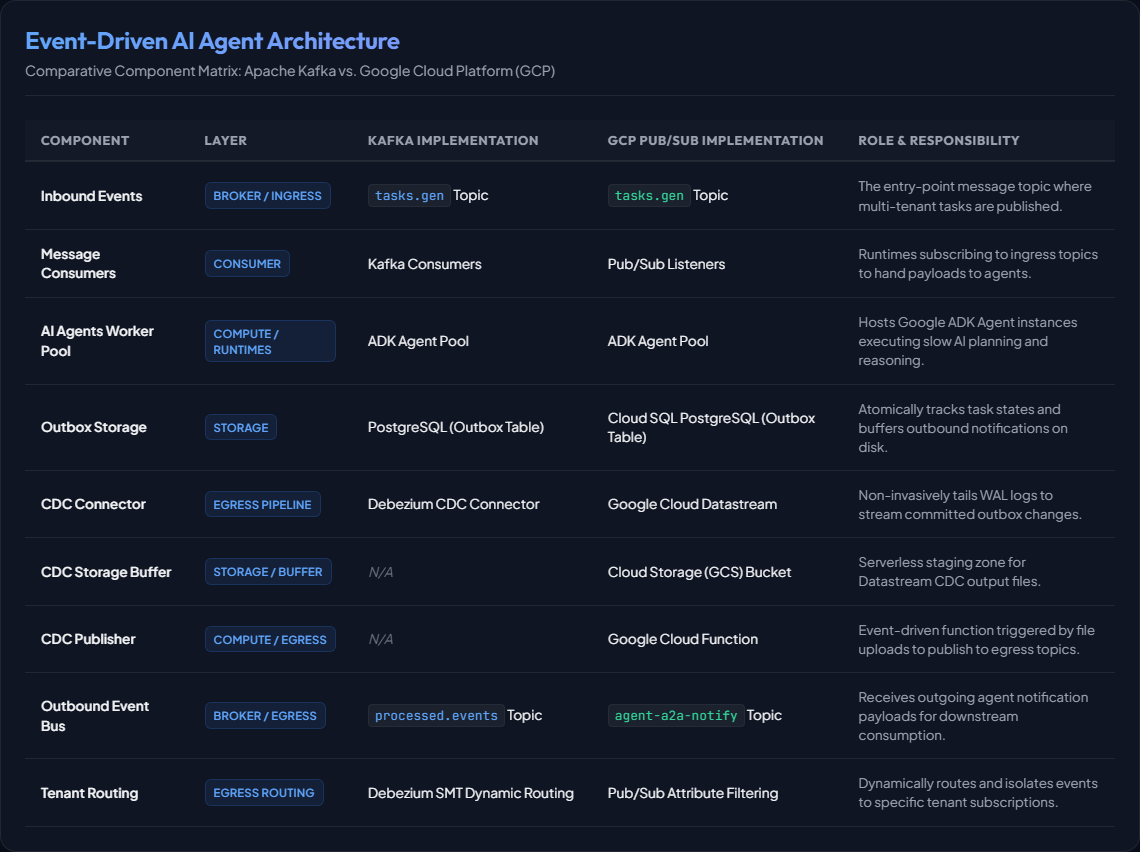
Component Directory & Responsibilities
2. Core Components & Logic
A. The Atomic Transaction (ADK Side)
To guarantee delivery, the Agent must never send a notification directly. It uses its persistent database as a buffer.
- The Action: When an ADK tool completes, it opens a database transaction.
- The Write: It updates the
TaskState(logical completion) and inserts a JSON payload into theOutboxtable. - The Guarantee: If the DB commit succeeds, the notification is physically on disk. If the Agent crashes during the process, the transaction rolls back, and the Kafka Listener retries the task.
B. The Reliability Engine (Debezium CDC)
Debezium sits outside your application logic, acting as a bridge between the DB and Kafka.
- Non-Invasive: It reads the Database Write-Ahead Log (WAL). It does not "query" the table, so it doesn't slow down the database.
- At-Least-Once: It tracks its "offset" (position) in the logs. If Debezium crashes, it restarts exactly where it left off, ensuring no outbox row is ever ignored.
C. The Scaling Strategy (Router SMT)
For 100s of agents, you cannot have one giant "notifications" topic (it creates security risks and performance bottlenecks).
- Router Logic: A Single Message Transform (SMT) inside Debezium inspects each row.
- Dynamic Routing: It maps
tenant_idto a destination topic name (e.g.,outbox.row.tenant_A$\rightarrow$topic.notifications.A). - Isolation: This ensures Tenant A's agents cannot physically subscribe to Tenant B's events.
4. ADK A2A Notifications via Outbox
Yes, absolutely. In fact, using ADK A2A Notifications with the Debezium Outbox pattern is the "gold standard" for building a reliable agent platform.
However, you have to change how the ADK Agent sends the notification. By default, ADK might try to send notifications directly via a Webhook or an internal service. To make it work with Debezium, you must "intercept" that notification and route it into your database instead.
Here is how you implement ADK A2A Notifications via Outbox:
A. Understanding ADK A2A Notifications
In Google's Application Development Kit (ADK), Agent-to-Agent (A2A) Notifications enable collaborative, multi-agent workflows. Instead of operating in isolation, agents can pass messages, delegate sub-tasks, or report intermediate execution states to other downstream agents.
How A2A Notifications Work by Default:
- Direct Invocation/REST: When an agent needs to notify another agent, ADK packages the event into a standard JSON metadata envelope containing
sender_agent_id,target_agent_id,task_id,tenant_id, and the custom message payload. - Synchronous Push: By default, the sending agent uses ADK's built-in
PushNotificationServiceto transmit this payload directly to the target agent's HTTP endpoint. - The Vulnerability: This direct communication method relies on synchronous network availability. If the receiving agent is offline, restarting, scaling, or throttled by rate limits, the notification fails, leading to lost events and broken multi-agent pipelines.
[!NOTE] Payload vs. Protocol: In this event-driven architecture, the database does not store HTTP requests or connection details. Instead, the agent serializes the raw ADK A2A JSON metadata/payload directly into the
agent_outboxtable. Debezium/Datastream streams this exact JSON structure downstream, decoupling the communication protocol completely from HTTP.
B. The Strategy: Custom PushNotificationService
In the ADK, notifications are handled by a PushNotificationService. To use Debezium, you don't use the default implementation. You create a custom one that writes to your SQL Outbox Table.
C. Implementing the Bridge in ADK
To achieve this, you override the ADK's notification behavior. Here is the conceptual implementation:
i. The Outbox Table Schema (Postgres / Cloud SQL)
The table must store the standard A2A metadata so that downstream agents or consumers know how to handle the message. The tenant_id is used by the Debezium SMT Router for Kafka topics, or mapped directly to Pub/Sub Attributes for GCP-native subscription filtering.
CREATE TABLE agent_outbox (
    id UUID PRIMARY KEY,
    tenant_id TEXT,           -- Used for routing/attributes
    destination_agent_id TEXT,-- Target agent identifier
    a2a_payload JSONB,        -- The actual ADK A2A payload
    created_at TIMESTAMP DEFAULT CURRENT_TIMESTAMP
);
ii. The Custom ADK Notification Service (Python/Java pseudocode)
You create a class that implements the ADK PushNotificationService interface.
class SqlOutboxNotificationService(PushNotificationService):
    def __init__(self, db_session):
        self.db = db_session

    def send_notification(self, notification: A2ANotification):
        # Instead of sending an HTTP request, we save to the DB
        # This MUST happen within the same transaction as the agent's work
        self.db.execute(
            "INSERT INTO agent_outbox (tenant_id, destination_agent_id, a2a_payload)
             VALUES (:t_id, :dest_id, :payload)",
            {
                "t_id": notification.tenant_id,
                "dest_id": notification.target_agent_id,
                "payload": notification.to_json() # The standard A2A format
            }
        )
D. Why this is better than "Standard" A2A Notifications
| Feature | Standard ADK A2A (Direct) | ADK + Debezium Outbox |
|---|---|---|
| Reliability | Risky: If the network blips or the receiving agent is down, the notification is lost. | Guaranteed: If the DB transaction completes, the notification will eventually reach Kafka. |
| Consistency | Weak: Agent state might say "Done," but the notification failed to send. | Strong: Notification and State update are one single atomic unit. |
| Backpressure | The sending agent might crash if it tries to retry 1000 failed notifications. | Kafka handles the buffering. The sending agent's job is done once it hits the DB. |
| Visibility | Hard to track what notifications were sent. | You have a permanent audit log in your outbox table. |
E. Multi-tenant Routing
Because you are using ADK A2A payloads inside the outbox, your Debezium Router can be very smart. It can look at the a2a_payload and route based on:
- Tenant ID: Put it in the correct tenant's Kafka topic.
- Notification Type: Is this an "In-Progress" update or a "Final Result"? You can route these to different Kafka partitions for priority processing.
Summary of A2A Integration
To use ADK A2A Notifications with Debezium:
- Configure ADK to use a persistent database (SQL/Spanner).
- Override the
PushNotificationServiceto perform a databaseINSERTinstead of an external API call. - Use Debezium to watch that table and push the A2A JSON strings into Kafka.
- Result: You have a rock-solid, multi-tenant event pipeline where no notification is ever dropped.
5. GCP-Native Implementation Alternative: Google Cloud Pub/Sub
Yes, you can absolutely use Google Pub/Sub instead of Kafka. In many ways, it is simpler for an enterprise already on Google Cloud because it is "serverless" (no brokers to manage).
However, you still need a mechanism like Debezium (or a Google-native equivalent) to ensure guaranteed delivery.
A. Why you still need a "Bridge" (The CDC Layer)
Even with Pub/Sub, the "Dual-Write Problem" still exists.
- If your Agent code tries to call
pubsub_client.publish()directly after a database update, and the network blips or the Agent pod restarts between those two lines of code, the notification is lost. - The Outbox Pattern (Writing to DB first) is still the only way to guarantee that the message is never lost.
B. GCP-Native CDC: Google Cloud Datastream
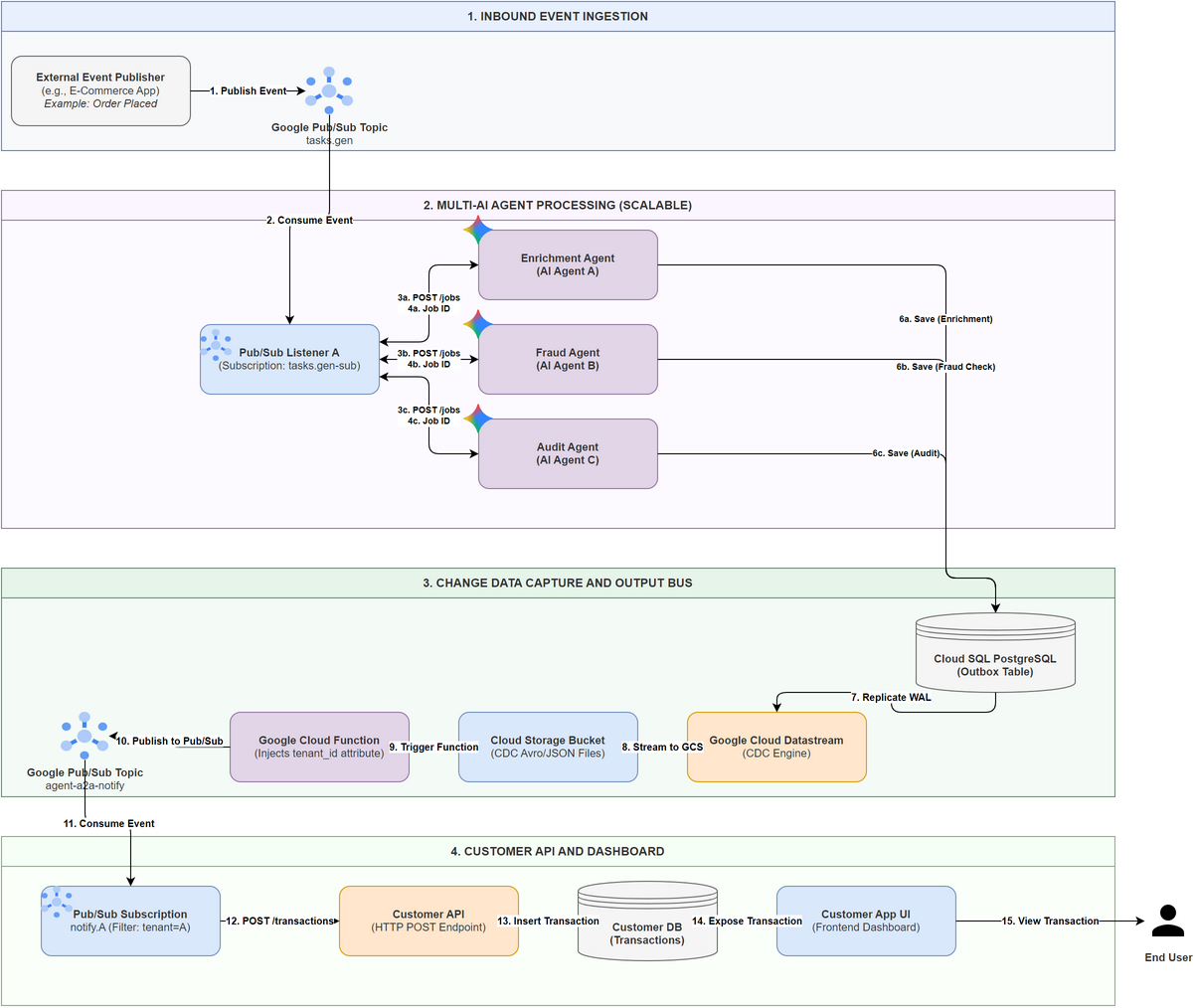
Since we are using Google Pub/Sub with Cloud SQL PostgreSQL, we do not need to run a Debezium connector cluster (which requires Kafka Connect). Instead, we use Google’s fully managed CDC service:
- Google Cloud Datastream: Datastream tails the WAL logs of your Cloud SQL PostgreSQL instance in a serverless, non-invasive manner. Since Datastream streams changes to a Google Cloud Storage (GCS) Bucket, we use a lightweight, event-driven Google Cloud Function triggered by new file uploads to parse the outbox rows and publish them to Google Cloud Pub/Sub.
C. High-Level Architecture Diagram (Google Pub/Sub Version)
D. Key Multi-Tenant Differences with Pub/Sub
When using Pub/Sub for 100s of agents/tenants, the "Router" logic changes slightly:
i. Topic Per Tenant vs. One Big Topic
- Kafka: Usually requires different topics for isolation.
- Pub/Sub: You can use one single Topic but create multiple Subscriptions with Filters.
- How it works: When the CDC bridge pushes to Pub/Sub, it adds an Attribute:
tenant_id: "tenant_7". - The Subscription for Tenant 7 has a filter:
attributes.tenant_id = "tenant_7". Pub/Sub handles the routing automatically. This is much easier to manage than hundreds of Kafka topics.
ii. Ordering
- In Kafka, ordering is guaranteed within a Partition.
- In Pub/Sub, you must enable "Ordering Keys". Use the
task_idortenant_idas the ordering key to ensure that "Task Started" notifications never arrive after "Task Finished" notifications.
Summary of Pub/Sub Alternative
- Use Pub/Sub if: You want a 100% managed, serverless experience and don't want to manage Kafka brokers or Kafka Connect clusters.
- Still use the Outbox: Whether it's Kafka or Pub/Sub, the Agent writes to the Database Outbox table first.
- The "Debezium" role: If you are all-in on Google, Google Cloud Datastream is the preferred "Debezium" equivalent because it is fully managed by Google.
Summary & Future Recommendations
Transitioning to an event-driven architecture is a key milestone in designing enterprise-grade AI agent systems. It solves core concerns such as UI latency, system performance under heavy load, and resilience to API rate limits or runtime failures.